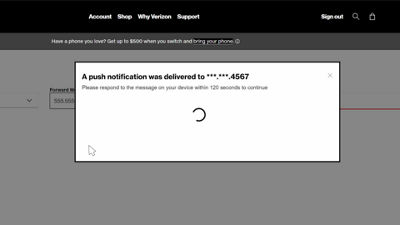
To forward your calls simply go to m.vzw.com/callforwarding and sign in to your My Verizon account. Or if you’re already signed in, look for the device you want to forward on the account overview page and click Manage device. Next, scroll down to Call forwarding and click Manage. From here you can use Call Forwarding to temporarily forward your calls to a landline or another active mobile number.
If you have multiple numbers on your account, you'll first select the number that you want forwarded. Once you have made your selection, enter the number you want to have your calls forwarded to and click Update Call Forwarding Status.
To keep your account safe, follow the prompts to verify your information with a push notification or email. You'll have 120 seconds to respond to the message sent. Once complete, you're done. All calls are now being forwarded. And you'll see the "Active" status displayed on screen.
Now when you're ready to cancel call forwarding, simply repeat the steps and select Cancel Call Forwarding.
Call forwarding can also be set up on your phone in the My Verizon app or using keypad codes. In the app, in the account section, select the device you want to manage. Scroll down and tap Manage call forwarding. Enter the number you want to forward to, and tap Update Call Forwarding Status. It's that easy. To cancel, just tap Cancel Call Forwarding.
To use keypad codes, simply dial *72, enter the 10-digit phone number you want to forward calls to. For example *72 555-123-4567 and hit Send or Call. Wait for the confirmation tone or message and then hang up. That's it.
To forward calls only when your line is busy or there is no answer, press *71 and the 10-digit number you want to forward calls to. Press Send and wait for the confirmation tone.
To turn off Call Forwarding just dial *73 and wait for the confirmation tone or message. Then hang up. It's that simple.
Just a couple of things to keep in mind... that once you have forwarded your calls your mobile phone won't ring until you cancel the call forwarding, and your text and picture messages will not be forwarded. Also, airtime usage still applies to the forwarded calls, even if you are sending your calls to a landline phone. If you don't have a plan that includes long distance, you will be charged on forwarded calls just the same as if they were made on your mobile phone.