Verizon LTE Internet and Home Phone - Activate / Set Up Device
Here's how to quickly set up your Verizon LTE Internet and Home Phone.
- The former name of this device is the Verizon 4G LTE Broadband Router with Voice.
- If you are activating an exchange for a previous device, it may require that the SIM number of the new device be manually entered before completing the process below.
- Confirm your computer meets the minimum system requirements:
- Compatible with all major operating systems.
- Works with latest versions of browsers, including:
- Android™
- Google Chrome®
- Firefox®
- Internet Explorer®
- Safari and Mobile Safari™
- Insert and charge battery.
- If desired, install the optional antenna.If using the optional antenna, align it with the antenna port on the router and attach securely.Use supplied cable only and utilize its full length to position antenna as far away from router as possible.If mounting antenna to wall, position it as far off the ground as possible.Don't operate the router and antenna within 2 inches of each other.
- Connect power adapter as follows:
- Plug power cord into the designated power port.
- Plug the power adapter into wall outlet.LTE Internet and Home Phone automatically powers on then guides you through welcome process for connecting to Wi-Fi.If needed, the Wi-Fi Name (SSID) and password can be obtained after an initial power up or a factory reset as follows:
- Power the device on.
- SelectMenu.Utilize the Arrow icons to highlight and the Checkmark icon to select.
- SelectOpento display the Wi-Fi name/password.
- Once welcome process completes, ensure at least 1 bar shows for the voice strength signal indicator.If at least 1 bar doesn't show, move to an alternate location with a stronger signal.
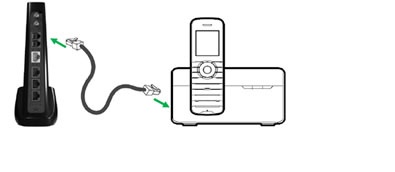
- Connect your telephone as follows:Don't plug the Verizon LTE Internet and Home Phone into a telephone jack.
- Unplug telephone cord from wall's telephone jack.
- Plug the end of the telephone cord that was removed from the wall jack into one of the two phone ports on the back of the device.The other end of telephone chord must remain plugged into the back of the telephone's base unit.
- Make a test call.
- If desired, set up a voicemail account.
- If desired, plug Ethernet cable into one of the 3 designated ports.The other end of cable must remain plugged into the Ethernet port of the device you wish to connect.