Software Upgrade Assistant (Motorola) - Enable / Disable Auto Updates
Here's how to enable or disable automatic updates in the Software Upgrade Assistant for Motorola.
- The Software Upgrade Assistant (SUA) can be configured to automatically prompt for software updates; ensure the wireless device is powered on, unlocked (if device lock-enabled), and connected to a compatible computer using a USB cable.
- The most recent software version is available on the SUA tool within a week of a new software update.
Windows
- Ensure the Software Upgrade Assistant software is installed. Refer to Initial Setup - Software Upgrade Assistant for assistance.
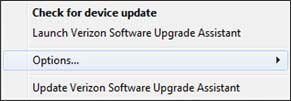
- From the taskbar (located in the lower-right), right-click theSoftware Upgrade Assistant tray icon
.
- ClickOptions.
- ClickAutomatically check for device updatesto enable or disable.Enabled when a check mark is present.

Macintosh
- Ensure the Software Upgrade Assistant software is installed. Refer to Initial Setup - Software Upgrade Assistant for assistance.
- From the menu bar, click theMotorola icon
.
- ClickOptions.
- ClickAutomatically check for device updatesto enable or disable.Enabled when a check mark is present.