Verizon Wireless Network Extender - Determine Device by SKU
Here's how to determine the Network Extender device by SKU.
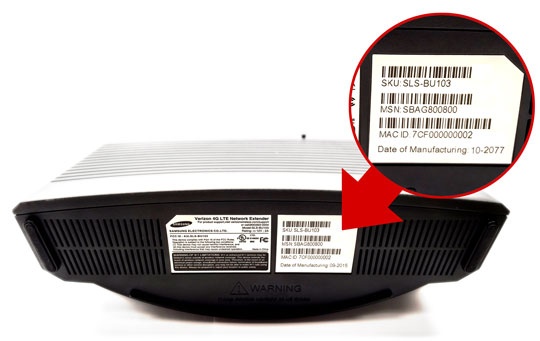
4G LTE Network Extender
- From the bottom of the device, locate the SKU (Stock Keeping Unit) on the barcode label.A magnifying tool may be needed to the view the info.
- Refer to the following for device identification:
- 4G LTE Network Extender
- SLS-BU103
4G LTE Network Extender 2
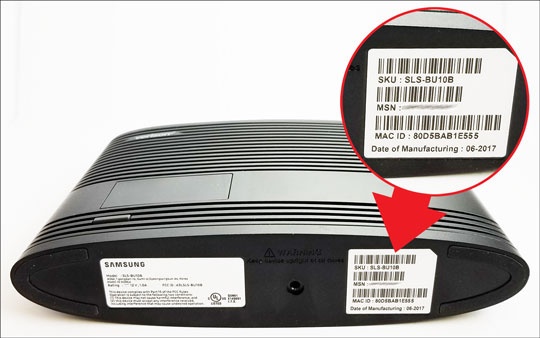
- From the bottom of the device, locate the SKU (Stock Keeping Unit) on the barcode label.A magnifying tool may be needed to the view the info.
- Refer to the following for device identification:
- 4G LTE Network Extender 2
- SLS-BU10B
4G LTE Network Extender for Enterprise
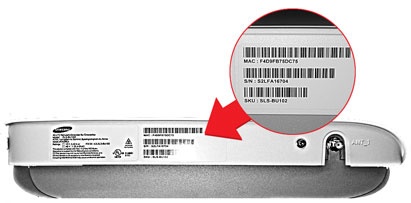
- From the ANT_1 side of the device, locate the SKU (Stock Keeping Unit) on the barcode label.A magnifying tool may be needed to the view the info.
- Refer to the following for device identification:
- 4G LTE Network Extender for Enterprise
- SLS-BU102
- SLS-BU1023
4G LTE Network Extender for Enterprise 2
- From the side of the device, locate the SKU (Stock Keeping Unit) on the barcode label.A magnifying tool may be needed to the view the info.
- Refer to the following for device identification:
- 4G LTE Network Extender for Enterprise 2
- SLS-BU10G