Turn SIM PIN On / Off - Verizon Jetpack® 4G LTE Mobile Hotspot - AC791L
View this to lock the SIM card for your Verizon Jetpack 4G - AC791L and prevent use until a PIN is entered.
To lock your SIM card so it can't be used until a PIN is entered, view this info.
Enabling the Subscriber Identity Module (SIM) Personal Identification Number (PIN) locks the SIM card so it can't be used until the correct code is entered. If the incorrect PIN code is entered too many times, refer to Locating the 4G SIM PIN/PUK - My Verizon Website to obtain a new PIN Unblocking Key (PUK).
- Access the Admin Web Interface.
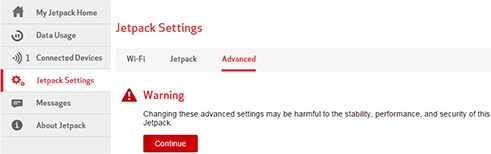
- From the left menu, clickJetpack Settings.
- From the Advanced tab, clickContinue.
- ClickSIM.
- From SIM PIN Lock Feature, click "Turn On PIN Lock" to enable or "Turn Off PIN Lock" to disable.
- From the "Enter current SIM PIN..." field, enter the current SIM PIN.The default SIM PIN is 1111.
- ClickSave(located at the bottom).The save option only appears after a change is made.