Network Mode Settings - Verizon Jetpack® 4G LTE Mobile Hotspot - AC791L
View this info on network mode settings if you're having issues with voice / data services on your AC791L mobile hotspot.
- Access the Admin Web Interface.
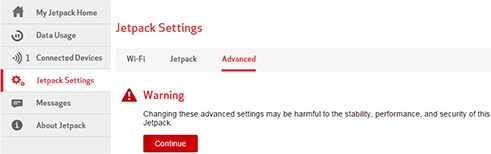
- From the left menu, clickJetpack Settings.
- From the Advanced tab, clickContinue.
- ClickNetworks.
- Click the 'Network technology' fieldDropdown menuthen select the appropriate setting:
- Global (default): This is the preferred setting for most locations.
- LTE Only: This setting should only be selected if experiencing service issues in locations that offer multiple network types and only LTE is needed.
- CDMA Only: This setting should only be selected if experiencing service issues in locations that offer multiple network types and only LTE is needed.
- LTE/UMTS/GSM: This setting should only be selected if experiencing service issues in locations that offer multiple network types and only LTE is needed.The preferred international carrier is automatically selected.You can manually select an alternate carrier but it may require as many as 6 attempts to successfully register.
- ClickSave(at the bottom).The save option only appears after a change is made.