Samsung Chromebook Plus - Common Camera Settings
Here's info on common camera settings (e.g., flash, timer, front / rear camera, etc.) for your Chromebook Plus.
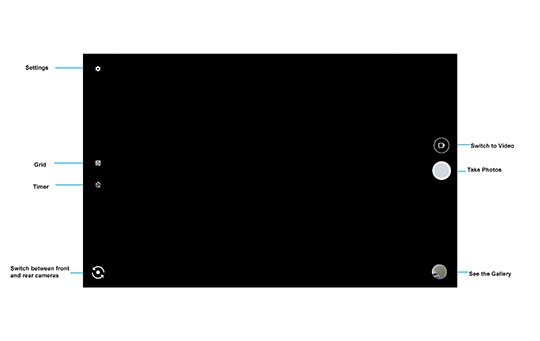
Shutter (photo and video)
- Navigate:.Apps iconSettings
- Select one of the following camera options:
- To take a photo, tap or click theCamera icon.
- To record a video:
- Tap or click theSwitch to video iconto change from camera to video.
- Tap or click theVideo record icon.




Timer
- Navigate:.Apps iconSettings
- Tap theTimer icon.
- Select an option (e.g., 3 Seconds, 10 Seconds, Timer off).

Grid
- Navigate:.Apps iconSettings
- Tap theGrid icon.
- Select an option (e.g., 3x3, 4x4, Golden Ratio, Grid off)

Switch Cameras
- Navigate:.Apps iconSettings
- Tap theSwitch Camera iconto select the front or rear camera.

Settings
- Navigate:.Apps iconSettings
- From the main camera screen, tap theSettings icon.
- Tap or click either of the following to turn on
or off
:
- Save location
- Camera sounds
- Tap or clickFront camera photo resolutionthen choose one of the following:
- (16:9) 0.9 mexapixels
- (16:9) 0.2 mexapixels
- (4:3) 0.3 mexapixels
- (4:3) 0.1 mexapixels
- (4:3) 0.0 mexapixels
- Tap or clickBack camera photo resolutionthen choose one of the following:
- (4:3) 12.6 mexapixels
- (4:3) 1.9 mexapixels
- (4:3) 1.2 mexapixels
- (16:9) 2.1 mexapixels
- (16:9) 0.9 mexapixels
- Tap or clickBack camera video resolutionthen choose one of the following:
- HD 1080p
- HD 720p
