Alcatel GO FLIP™ V - Volume Controls
Here's how to adjust volume on your GO FLIP V if it won't vibrate or ring when getting messages or alerts.
Adjusting volume controls can help if you're not getting notifications, ringing, vibrating when receiving calls, texts and/or emails.
Press the Volume keys up or down adjust:
- earpiece volume while on a call.
- media volume while listening to music or playing videos.
- ringtone volume when not on a call or listening to music or playing videos.
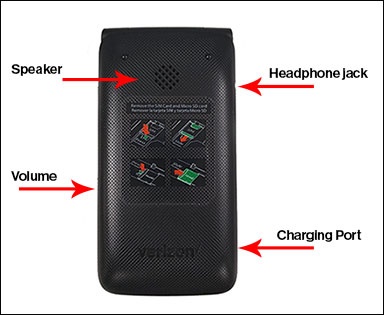
To adjust volume settings when not on a call, do the following:
- From the main screen, selectMenu.Utilize the 5-way navigation pad to highlight and the OK button to select.
- SelectSettings.
- SelectSound & notification.
- SelectVolume.
- Select 'Alert Sounds' or 'Media'.
- Press the bottom of the navigation pad (to decrease volume) or the top of the navigation pad (to increase volume) then selectOK.