Samsung Galaxy Watch3 - Display Settings
Here's how to adjust display settings on your Galaxy Watch3.
From your Android or Apple iPhone, ensure your Galaxy Watch3 software is up to date as the steps below apply to the most recent version.
Brightness
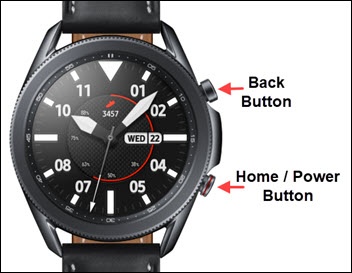
- From the watch screen, press theHome buttonto open the apps screen.
- Tap theSettings icon.
- TapDisplay.
- TapBrightness.
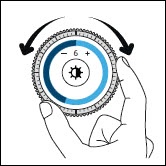
- Turn the bezel clockwise or counterclockwise to the desired level.
- Press theBack button.
- TapAuto low brightnessthen turn on
or off
as desired.

Screen Timeout
- From the watch screen, press theHome buttonto open the apps screen.
- Tap theSettings icon.
- TapDisplay.
- TapScreen timeout.
- Tap the preferred screen timeout:
- 10 seconds
- 15 seconds
- 30 seconds
- 1 minute
- 5 minutes
Background Style
- From the watch screen, press theHome buttonto open the apps screen.
- Tap theSettings icon.
- TapDisplay.
- TapBackground style.
- Swipe the screen left or right to scroll, then tap the desired background style.
Font
- From the watch screen, press theHome buttonto open the apps screen.
- Tap theSettings icon.
- TapDisplay.
- TapFont.
- TapFont style.
- Swipe the screen up or down to scroll, then tap the desired font style.
- TapFont size.
- Swipe the screen up or down to scroll, then tap the desired font size.