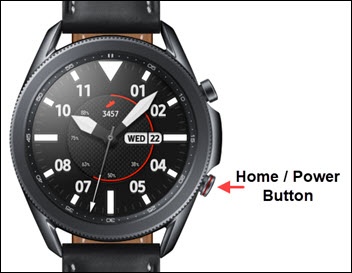
Samsung Galaxy Watch3 - Turn Power Saver On / Off
Here's how to turn 'Power mode' on or off to help manage battery performance for your Galaxy Watch3.
- From your Android or Apple iPhone, ensure your Galaxy Watch3 software is up to date as the steps below apply to the most recent version.
- While enabled, 'Power Saving' and 'Watch Only' reduces the performance of your Galaxy Watch3 to help improve battery life.
- From the watch screen, press theHome buttonto open the apps screen.
- TapBattery.
- TapPower Modethen select one of the following:
- Standard: Default setting. Power saving isn't enabled.
- Power Saving: Turns off everything except calls, messages, and notifications.If prompted, review the message then tap theAccept icon
to continue.
To return to 'Standard' Power Mode, tapPower savingfrom the watch screen then tap theAccept iconto turn off Power saving. - Watch Only: Turns off everything except watch.If prompted, review the message then tap theAccept iconto continue.To return to 'Standard' Power Mode, press and hold theHome buttonfor approximately 3 seconds and allow the watch to restart.