LTE Network Extender - Configure Network Settings
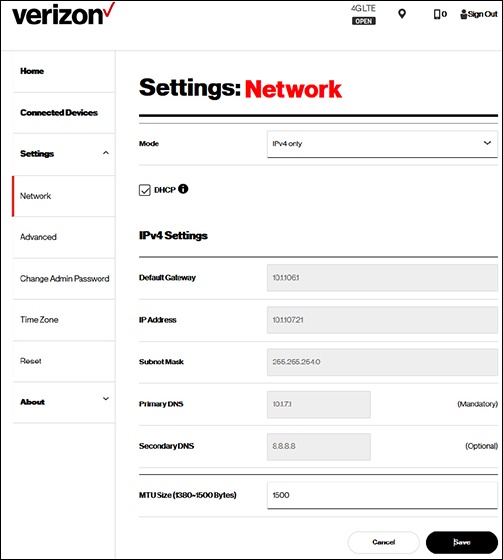
Here's how to configure network settings (e.g., Default Gateway, IP Address, etc.) for your LTE Network Extender.
- Dynamic Host Configuration Protocol (DHCP) is the default network setting.
- For advanced network configuration refer to IT Department / ISP for assistance.
- Access the Network Extender Admin then clickSettings.For assistance, refer to Access Network Extender Admin.
- ClickNetwork, then ensure the DHCP box is not checked and modify the following info as needed.
- Default Gateway
- IP Address
- Subnet Mask
- Primary DNS
- Secondary DNS
- MTU Size
- ClickSave.
- From the 'Warning' prompt, clickOK.
- From the 'Information' prompt, clickOK.