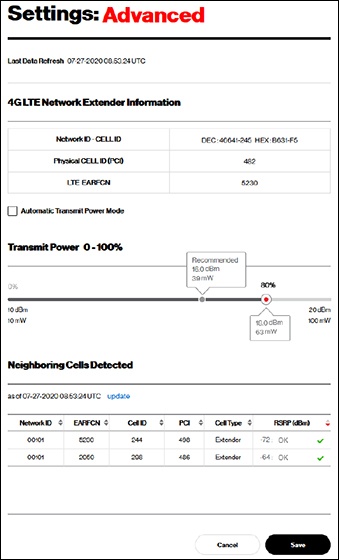
LTE Network Extender - Configure Transmit Power
Here's how to configure the transmit power of your LTE Network Extender.
Adjust this setting manually only if directed.
Network Extender transmit power is automatically adjusted based on macro network signal strength
- Access the Network Extender Admin then clickSettings(on the left).For assistance, refer to Access Network Extender Admin.
- ClickAdvanced.
- From the 'Transmit Power' section, adjust the slider to the preferred level then clickSave(bottom of screen).'Automatic transmit power mode' must be unchecked in order to adjust the slider.
- From the 'Settings Modification Performance Impact' warning, clickOK.Adjust setting manually only if directed.