Verizon 5G Internet Gateway (LVSKIHP) - View LED Status Indicators
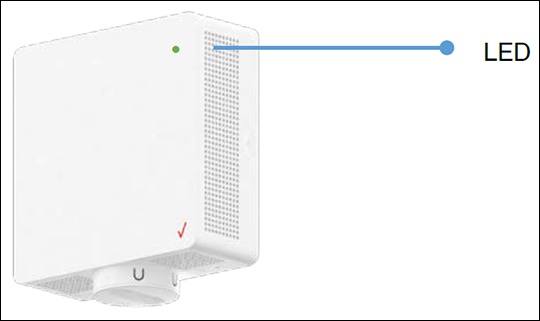
Here's how to identify the LED light status indicators on the 5G Internet Gateway (LVSKIHP).
The LED indicator is located on the front of the 5G Internet Gateway in the upper-right corner.
This content is for the 5G Internet Gateway (LVSKIHP). Refer to How to Identify Verizon 5G Home Equipment if you're unsure of the device model.
Status | Front LED | Sound |
Device is booting up Soft Fade in-out White |  | N/A |
WPS and Bluetooth pairing mode (Manual option) Single press the multifunction sync button to establish connection |  | N/A |
WPS/Bluetooth is paired Blue blinking ceases | Click sound Plays once immediately after establishing connection | |
Activation completed Device successfully connected to LTE, is activated and will start searching for 5G signal | Click sound Plays once immediately after activation | |
No 5G signal Device cannot detect 5G signal immediately after activation |  | Error sound Plays once immediately after switching to operational mode |
Poor 5G signal 5G signal is detected after activation but signal strength is not strong enough. |  | Error sound Plays once immediately after switching to operational mode |
Passing 5G signal Good 5G signal has been detected for installation. |  | Good signal sound Plays once immediately after switching to operational mode and finding passing signal |
Firmware update/Factory reset in progress |  | N/A |
Error (Fault) Hardware of software issue |  | Error sound Plays once immediately after incident |
Working as advertised Device setup is completed and Internet is active. Show solid white light and then dims to 50% brightness after 60 seconds. |  | N/A |
Wi-Fi is disabled Amber blinking ceases until Wi-Fi is enabled. |  | N/A |