Verizon Internet Gateway - Configure Wi-Fi Security Settings
Here's how to configure Wi-Fi security settings (e.g., Wi-Fi name, Wi-Fi password, etc.) on the Internet Gateway.
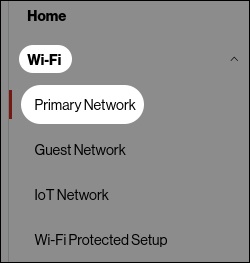
- Access the router admin page then click (left menu).Refer to Access Admin Page for assistance.
- From the 'Primary Network' screen, click theGear icon
to expand the section, adjust as desired then click
Apply Changes(upper right):- Wi-Fi Name (SSID)
- Wi-Fi Password
- SecuritySet encryption type used to secure the Wi-Fi traffic.
- Broadcast Wi-Fi network name (SSID)Broadcast Wi-Fi name from router to Wi-Fi clients.
- MAC AuthenticationLimits the Wi-Fi clients that can connect to router.