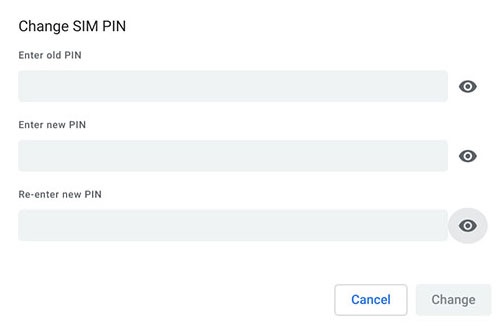
Orbic Chromebook - Enable / Disable / Modify SIM PIN
Here's how to change the SIM PIN for your Orbic Chromebook or turn it on or off.
- Enabling the SIM PIN locks the SIM card in your Orbic® Chromebook® so it can't be used until the correct code is entered.
- If the incorrect PIN code is entered too many times, refer to My Verizon Website - Locate the SIM PIN / PUK to obtain a new PIN Unblocking Key (PUK).
- Navigate:.LauncherSettingsMobile Data
- Under the 'SIM section', clickVerizon, then clickAdvanced.
- Click the 'Lock SIM card'switchto turn on
or off
.
To change your SIM PIN, ensure the switch is turned on then do the following:- Next to 'Lock SIM card' clickChange PIN.
- Enter the old PIN, the new PIN, and re-enter the new PIN, then clickChange.The default SIM PIN is 1111.
- Enter the current SIM PIN then clickEnter.