One Talk CP925 / CP965 IP Conference Phone - Call Recording via USB Storage
Here's how to record a call on the One Talk CP925 / CP965 IP Conference Phone.
- You can record up to 12 hours in one file. By default, the recorded files are saved in the internal SD card but can be saved to a USB flash drive if one is connected to a USB port on the phone.
- Recording can only begin during an active call.
- If one of the participants holds the conference call, only that participant is recorded. When a conference call is placed on hold, recording of the conference is paused. You can place or answer other calls, which will be recorded in the same file. When the conference call is resumed, recording of the conference resumes.
- If one of the participants mutes the conference call, only that participant is not recorded.
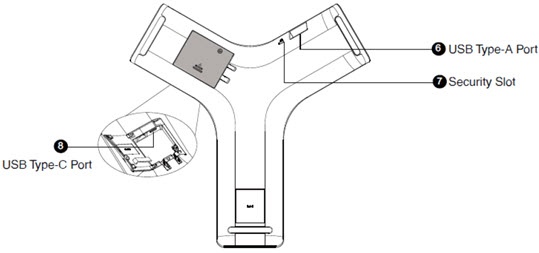
- If using a USB flash drive, connect it to one of the available USB ports.View from the bottom of the phone:
- From the Home screen, navigate: .
- If you have inserted a USB flash drive, tap USB to save the recorded audio to a USB flash drive.
- To record call audio:
- During a call, tap theRecord icon
to start recording.
- If a USB flash drive is connected, select the location where you want to save the recording.If on a conference call, all conference participants are recorded.If one of the participants holds the call, only that participant is recorded.If a conference call is placed on hold, the recording is paused; recording resumes when the conference call is resumed.
- You can set a mark by tapping theMark icon
while recording.
- Tap theCheckmark iconto stop recording.If the call is placed on hold, the recording is paused.If you mute the call, the muted party is not recorded.
- To play recorded calls on the desk phone:Recorded calls are saved in.AAC format and include a date and time stamp and the other party's number / IP address / name. For example, '20170515-1452-Tom' was created on May 15, 2017, at 14:52 and the call was with Tom.
- From the Home screen, navigate: .
- Tap Local or USB to select the storage location.
- Tap thePlay icon
next to the recording you want to play.
- To view the used and remaining space on your USB drive or internal storage:
- From the Home screen, navigate: .
- Tap Local or USB to select the storage location.
- View the available capacity.