One Talk VZP59 IP Desk Phone - Activate / Set Up Device
Follow these steps to perform initial activation on your One Talk VZP59 IP desk phone.
- Activation requires a valid US address for E911 functionality.
- Wi-Fi Calls always originate in the U.S., even when you're outside of the U.S.
- Calls to U.S. numbers are not billed (except for 411 or other premium calls).
- Calls to international numbers are billed according to your international long distance plan.
- A soft reset is needed on the desk phone when a new endpoint is added to the One Talk MDN.
- If the desk phone only boots partially and displays "Invalid security certificate", it must be replaced via the CLNR/WFG exchange process. The desk phone will not work under this condition.
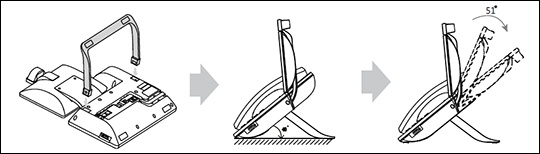
- Attach the desk mount stand.
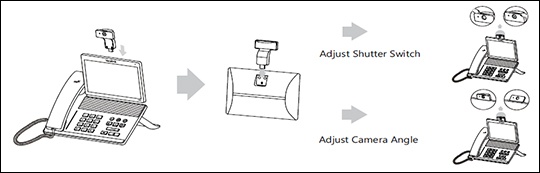
- Insert the cameraIf necessary, remove the rubber plugs first.
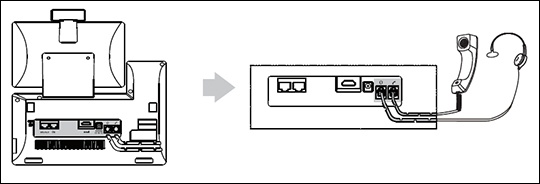
- Connect the headset.The wireless headset adapter and headset are sold separately.
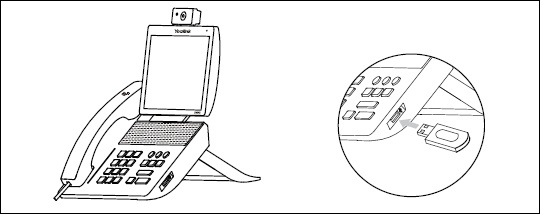
- If preferred, connect USB devices.Different USB devices can be used, such as a USB flash drive, USB headset, etc.
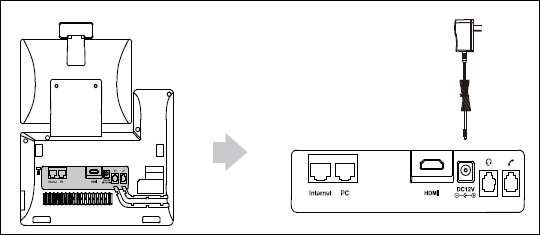
- Connect the power source.The AC adapter is optional; the phone can also run on Power over Ethernet (PoE).
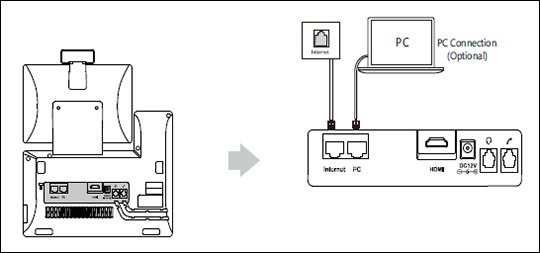
- Connect to the network by selecting one of the following options:Contact your IT administrator before selecting the network connectivity option.
- Connect to a wired network.
- Connect to a wireless network:
- From the desk phone display, swipe left or right to go to the second idle screen.
- Navigate: .
- Tap the desired network (SSID) to connect to it.If the network you want to connect to isn't available, tap theOptions icon
then tap
Scanto search for available networks. - If the network is secure, enter its password in the Password field then tapConnect.Tap (check)Show passwordto show characters as they're being entered.If necessary, tap (check)Show advanced optionsto configure the HTTP proxy for the Browser application.
- The desk phone begins the initialization process.The process may take up to 15 minutes.
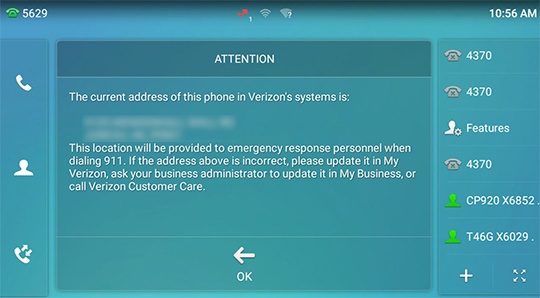
- From the 911 notification screen, tapOK.The 911 screen displays after successful activation.