Verizon Internet Gateway - Turn IoT Network On / Off
Here's how to turn the Internet of Things (IoT) network on and off to connect smart devices such as doorbells, lightbulbs, etc to the Internet Gateway.
- The Internet Gateway supports connection of multiple IoT devices on a separate Wi-Fi SSID. The IoT Network is designed to provide an easier setup experience for your Internet of Things (IoT) devices such as smart doorbells, lightbulbs, etc. which benefit from connecting to the 2.4 GHz band while keeping your Primary Network settings unchanged. IoT devices and Primary devices can communicate with no firewall restrictions separating them.
- By default, the IoT network is turned on.
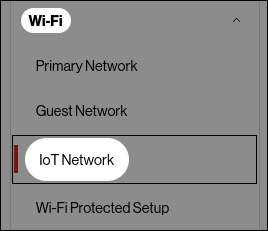
- Access the router Admin Page then click (left menu).
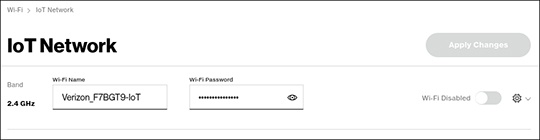
- From the 'IoT Network' section, enable
or disable
Wi-Fi then click
Apply Changes.