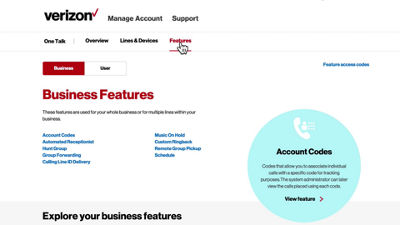
This video will show you how to set the outgoing caller ID for your One Talk account.
In the web portal, select the Features tab.
Under business features, select Calling Line ID Delivery. You can choose to send individual phone numbers for outbound caller IDs. Or select to have one number sent for all lines in your group.
If you want to send one caller ID for everyone in your group, Set the line number and company name as you would like it to display.
As an option, when using one number for the entire group, you can also select Allow Calling Line ID Name to allow individual end users to set their caller IDs. This will override any group settings. Click Submit to update your settings.
If you need additional assistance please refer to the One Talk Resources Support page.