Your Verizon account contains sensitive information, so you need to protect it in the same way you'd safeguard your online bank account. At Verizon we use the latest security technology - and we also recommend several simple steps you can take to keep your information safe.
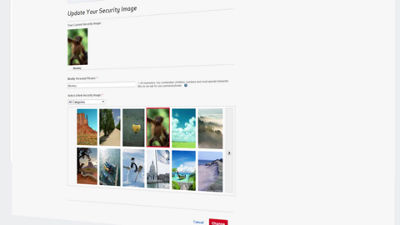
One of your first lines of defense is your account security image. It starts when you create a My Verizon account and choose your security image from one of multiple images. Every time you type your username on your My Verizon account, your chosen security image will appear. This image keeps you protected by giving you a visual signal that you're signing in to the real Verizon website, helping you avoid fake pages designed to mimic Verizon's site. If you haven't previously set a security image, you can easily add that feature by changing your password, where you'll be prompted to select one. If you don't have a security image on your account, you can create one by resetting your My Verizon Password. The system will automatically prompt you to create one.
You can also protect your account by choosing a strong password and effective security questions. When you create your password, avoid using phrases that contain your name, the names of family or friends, titles of popular movies or songs, or identifying numbers - like your phone number or your birth date. For your security questions, opt for questions that very few people would be able to answer. Remember exactly what personal information your security questions cover, and avoid sharing any of those details on social media. Finally, use a unique four or five digit number for your billing system password. Even if your personal information was somehow obtained, the billing system password would need to be used before any changes could be made to your account.
If you ever suspect that you've been the target of fraud or a phishing scam, change your password immediately. It's also a good idea to set reminders to change your password at regular intervals. And while it may seem convenient to use the same password on multiple sites, your information will be most secure if you select a password that's unique to your Verizon account.
To get more advice on preventing fraud or if you need to report a suspected security breach, visit www.verizonwireless.com/fraud.