Activate / Set Up Device - LG G Pad™ X8.3
Here's how to quickly set up your LG G Pad X8.3.
If you're upgrading your existing Verizon device, before proceeding, follow these steps to activate before proceeding with the instructions below.
To avoid potential issues, review the following:
- If performing first time (out-of-the-box) setup, ensure the SIM card is inserted.
- To activate the device on prepaid service, refer to Set up Verizon Prepaid Data Service.
- Accounts (e.g., Gmail, email, etc.) should be set up after activating the device (see Related Info section at the bottom of this page).
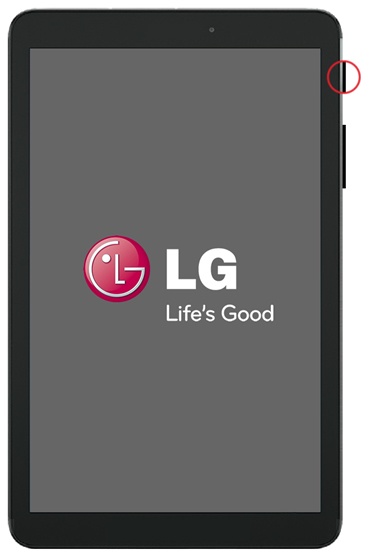
- If powered off, press and hold thePower buttonuntil the LG logo appears then release.
- From the Setup Wizard Welcome screen, select the appropriate language then tapNEXT(at the bottom).
- If presented with the Tablet Activation screen, tapNEXT.If necessary, allow several seconds for activation to complete.
- If presented with the Set up Wi-Fi screen, tapSKIP(lower-right).
- From the Email Accounts screen, tapSKIP(located at the bottom).
- If presented with the Add your account screen, tap .
- If presented with the Name screen, enter the first and last name then tapNEXT.
- From the Google services screen, select any of the following to enable or disable then tapNEXT:Enabled when a checkmark is present.
- Help apps find your location
- Improve location accuracy
- Help improve your Android experience
- From the Setup Wizard Summary screen, tapDONE(at the bottom).