LTE Network Extender - Initial Connection Activation and Setup
Here's how to complete the initial activation and setup of your LTE Network Extender.
- The initial startup of the Network Extender takes 30-60 minutes.
- If the Power / Status LED indicator is still blinking after 1 hour, relocate the GPS antenna to receive a stronger signal (see Related Info).
- For best results after activation, place the Network Extender in an elevated location, such as the top of a bookshelf or cabinet.
- Prior to beginning setup, ensure that Wi-Fi calling is disabled on the device.
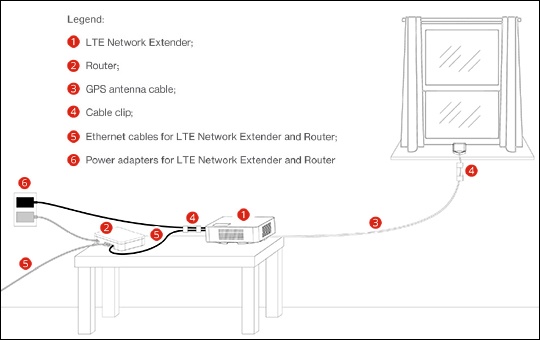
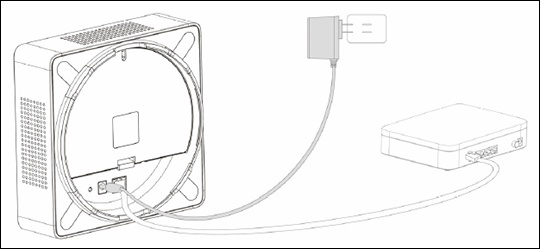
- Use the provided Ethernet Cable to connect the Network Extender LAN Port to an available LAN / Ethernet port on the router or modem.Ensure the router supports DHCP and VPN. Refer to the manufacturer's info for compatibility.
- Connect the provided power supply to the Network Extender 12V DC power input then plug the power adapter into an available power outlet.The use of a surge protector is recommended.It's recommended to use the Network Extender upright; however, it can also function when the device is flat.
- Reference the device display to determine the Network Extender status.Verify the Power / Status LED indicator blinking white. If the Power LED displays solid red, this indicates a hardware issue.
- During the initial setup the device display cycles through the activation steps and takes 30-60 minutes.
- Reference the device display to determine the final Network Extender status is "In Service".Press the button to the right of the display to view additional Device Display and Status info.
- Reference the device display chart for icon identification, check the following indicator lights:
- TheGPS Indicatorshows the GPS acquisition status and the number of GPS satellites currently tracked. Refer to View GPS Status to view GPS satellite info from within the Network Extender admin page.
- TheConnected Devicesshows the number of 4G devices connected to the Network Extender.
- Verify your phones are connected to the Network Extender:
- Turn on HD Voice to use voice services.
- From the wireless device, enter#48then press theSend keythen review the confirmation announcement:When connected, the announcement says: "Welcome to Verizon Wireless. You are under 4G LTE Network Extender Coverage with ID.".The device may display a visual indicator icon in the status bar.