LTE Network Extender - Use GPS Extension Cable
Here's how to install the GPS extension cable on your Network Extender.
- If a stable GPS signal isn't detected, follow the steps below to use the internal GPS antenna cable to improve reception.A minimum of 4 strong GPS satellite signals are required for a GPS location fix. The number of available satellites is shown on the LCD display during setup, or you can access the Network Extender admin page to verify GPS status.
- For best results, place the Network Extender in an elevated location near a south-facing window or a window with a clear view of the sky.
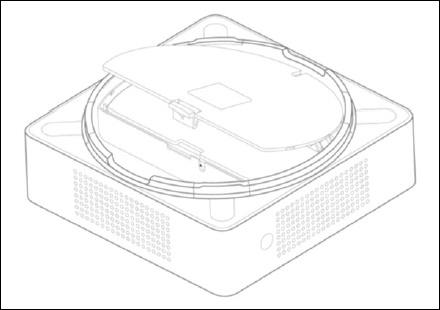
- Ensure the Network Extender is powered off by disconnecting the power adapter from the outlet then remove the rear cover.
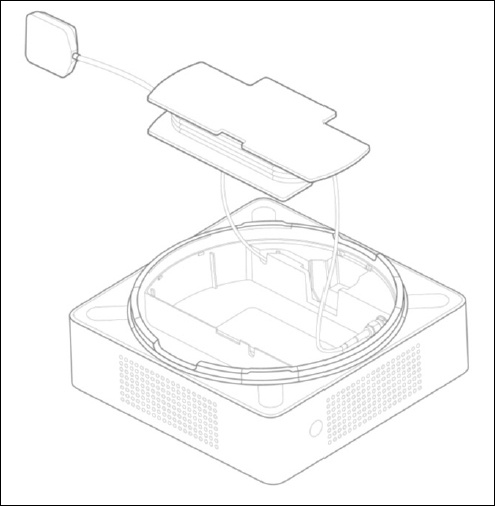
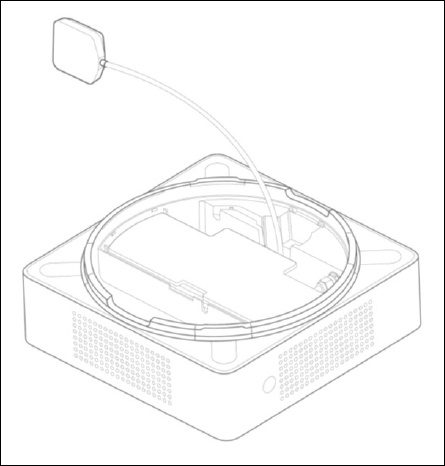
- Take out the GPS antenna and unwrap the cable.
- Return the plastic cable holder into place inside the Network Extender.
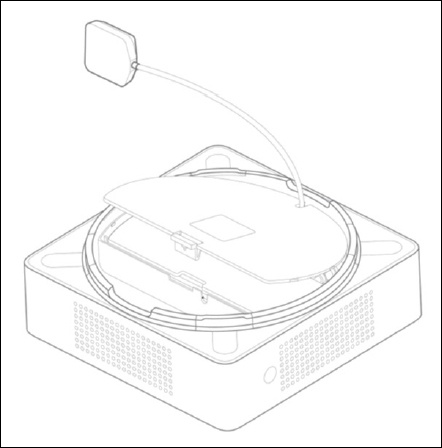
- Reattach the rear cover.
- Ensure the GPS cable is running through the notch in order to properly fasten the rear cover into place.
- Place the antenna close to a window.If needed, use double-sided tape to secure the bottom of the GPS antenna in place, but take care not to cover the antenna with tape.
- Turn your Network Extender back on by plugging it in and wait for it to begin searching for a GPS signal.This process may take up to 60 minutes.For best results, place the GPS antenna near a south-facing window or a window with a clear view of the sky.If sufficient GPS signal still can't be acquired, test your Network Extender at a different location.