LTE Network Extender - View Advanced Settings
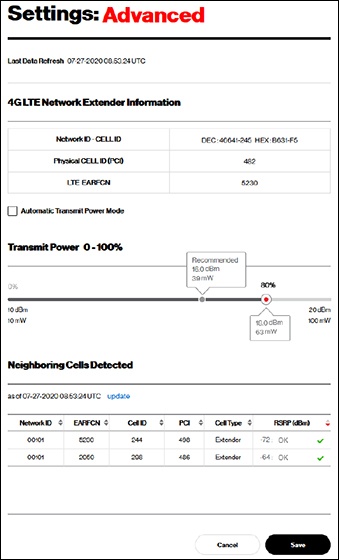
Here's how to view advanced settings (e.g., Network ID - CELL ID, Neighboring Cells Detected, etc.) for your LTE Network Extender.
Adjust 'Transmit Power' setting manually only if directed.
LTE Network Extender transmit power automatically adjusts based on macro network signal strength.
- Access the Network Extender Admin then clickSettings(on the left).For assistance, refer to Access Network Extender Admin.
- ClickAdvancedto view the following:
- Network Extender Information
- Network ID - CELL IDThe Cell ID value is repeated at the end of the #48 coverage confirmation announcement.
- Physical CELL ID
- LTE EARFCN
- Transmit PowerFor additional assistance, refer to Configure Transmit Power.
- Neighboring Cells Detected