Verizon 5G Internet Gateway (LVSKIHP) - Configure LAN Settings
Here's how to access LAN settings (IP address, Subnet mask, etc.) for the 5G Internet Gateway (LVSKIHP).
Changing advanced settings (e.g., IP address, Subnet mask, etc.) may be harmful to the stability, performance and security of the Verizon 5G Internet Gateway.
This content is for the 5G Internet Gateway (LVSKIHP). Refer to How to Identify Verizon 5G Home Equipment if you need to verify the model you're using.
- Sign in to the Admin WebGUI.You must be connected to the 5G Home Internet network to access the admin page.
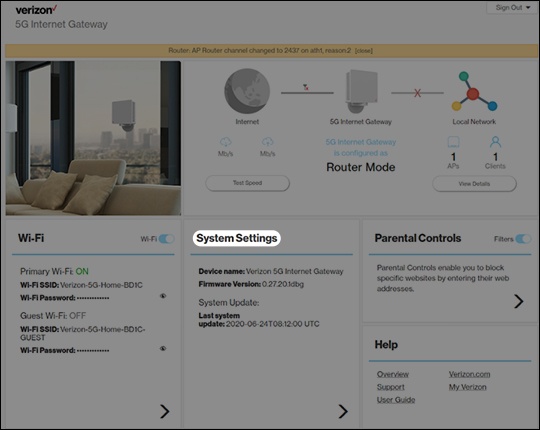
- From the Router Home screen, clickSystem Settings.
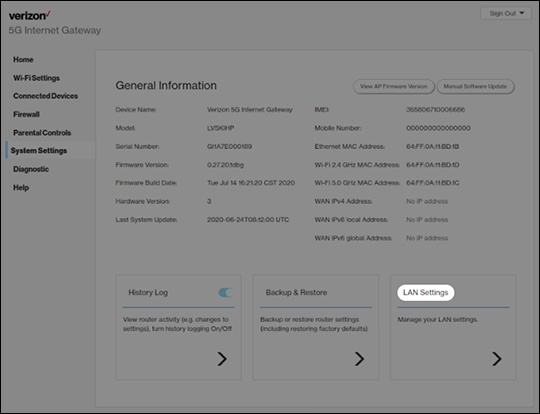
- From the General Information screen, clickLAN settings.
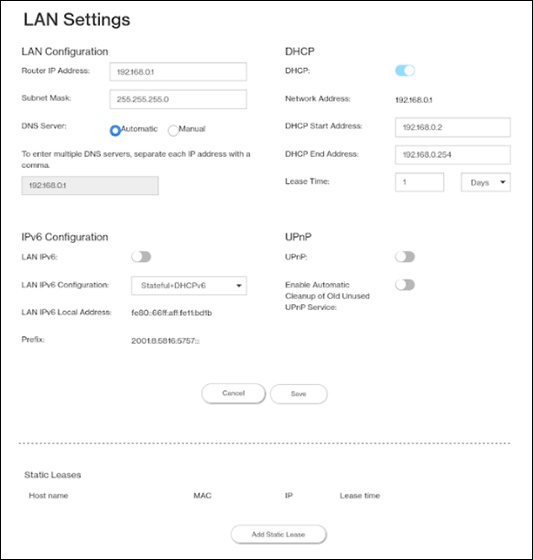
- From LAN Configuration, enter the desired info into the following fields:
- Router IP Address
- Subnet Mask
- DNS Server
- Automatic
- Manual
- From DHCP, click theDHCP switchto turn on
or off
.
- From DHCP, enter the appropriate info into the following fields:
- DHCP Start Address
- DHCP End Address
- Lease Time
- ClickSaveto update your preferences.