One Talk T67LTE 4G LTE Desk Phone - Activate / Set Up Device
Follow these steps to perform initial activation on your One Talk T67LTE 4G LTE desk phone.
- The T67LTE has an eSIM with the Verizon profile preloaded in it.
- Activation requires a valid US address for E911 functionality.
- The T67LTE must always be activated over an LTE connection. The phone will never perform a first time activation over LAN/Wi-Fi.
- Wi-Fi Calls always originate in the U.S., even when you're outside of the U.S.
- Calls to U.S. numbers are not billed (except for 411 or other premium calls).
- Calls to international numbers are billed according to your international long distance plan.
- A soft reset is needed on the desk phone when a new endpoint is added to the One Talk MDN.
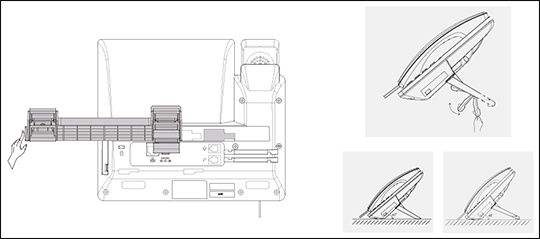
- Attach the desk mount stand.
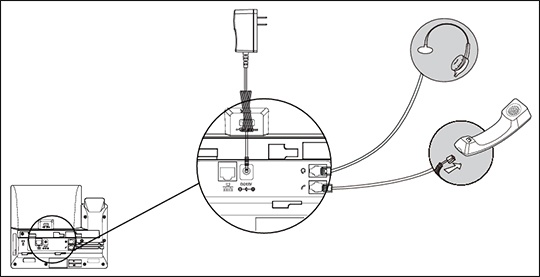
- Connect the cables.The T67LTE Desk Phone should be used with a Yealink® original power adapter (12 V/1 A) only. The use of a third-party power adapter may cause the damage to the phone.
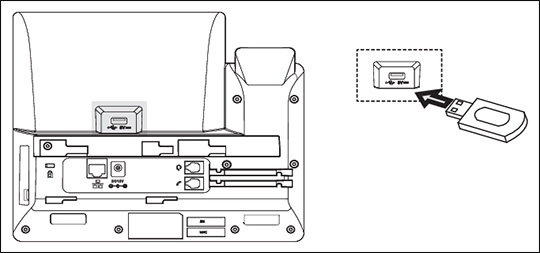
- Connect optional USB accessories as shown below:The USB port can be used to connect devices such as the EXP50 Expansion Module or a USB flash drive for call recording.
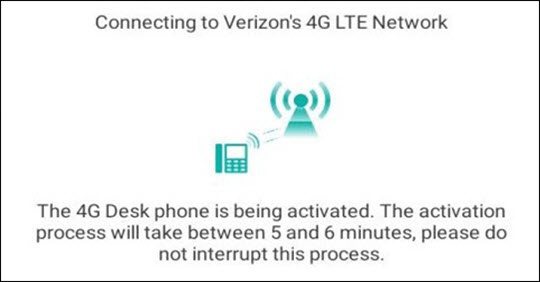
- The desk phone activation begins.Initial activation for T67LTE can only take place over an LTE connection and requires an optimal LTE signal.The process may take up to 20 minutes.The phone displays "Connecting to Verizon's 4G LTE Network".
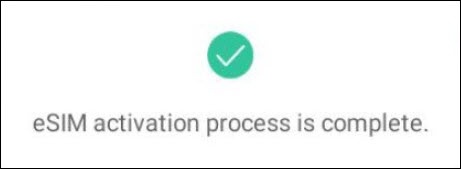
- Upon completion, the user will see this message telling them the eSIM activation was successful.The phone will proceed to update the firmware on the device and download configuration files. The phone will display a phone number (10 digit or extension) on the screen, the phone will be ready to be used.