One Talk CP960 IP Conference Phone - Activate / Set Up Device
Follow these steps to perform initial activation on your One Talk CP960 IP conference phone.
- Activation requires a valid US address for E911 functionality.
- Wi-Fi Calls always originate in the U.S., even when you're outside of the U.S.
- Calls to U.S. numbers are not billed (except for 411 or other premium calls).
- Calls to international numbers are billed according to your international long distance plan.
- A soft reset is needed on the desk phone when a new endpoint is added to the One Talk MDN.
- If the desk phone only boots partially and displays "Invalid security certificate", it must be replaced via the CLNR/WFG exchange process. The desk phone will not work under this condition.
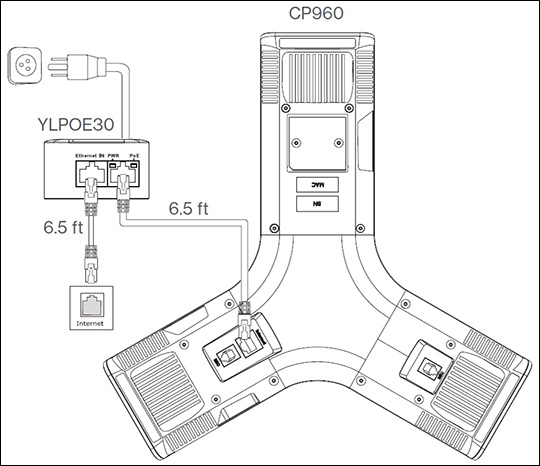
- Connect the power and wired network.This conference phone requires the Yealink YLPOE30 Power-over-Ethernet (PoE) adapter, which provides power and wired network connection using the same Ethernet cable.You can also connect to a Wi-Fi network after startup. Refer to Step 3 for more information.
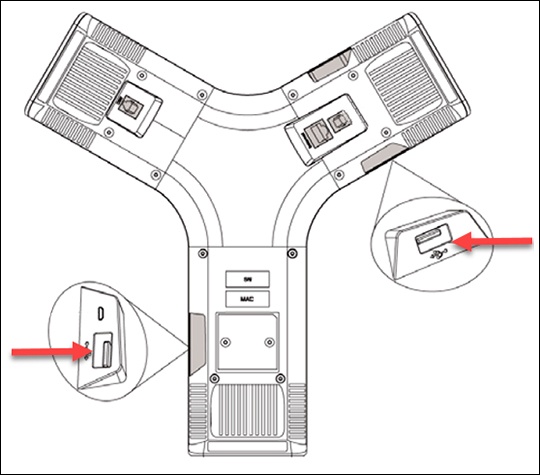
- If desired, connect a USB flash drive (for use with the Call Recording via USB feature) to either one of the USB ports.Only one USB flash drive can be used at a time.
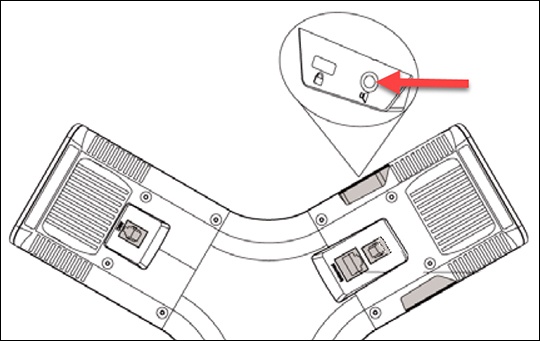
- CPE90 wired microphones and CPW90 wireless microphones (sold separately) can also be connected at this time.The CPE90 microphone plugs into a 3.5mm microphone port and does not require power.
- Configuring Wi-Fi via the user interface:
- From the Home screen, navigate: .
- If necessary, tap theWi-Fi switchto turn on.
- Tap the desired network (SSID) to connect to it.If the network you want to connect to isn't available, tap theOptions icon
then tap
Scanto search for available networks. - If the network is secure, enter its password in the Password field then tapConnect.Tap (check)Show passwordto show characters as they're being entered.If necessary, tap (check)Show advanced optionsto configure the HTTP proxy for the Browser application.
- Startup:
- After the IP phone is connected to the network and supplied with power, it automatically begins the initialization process.
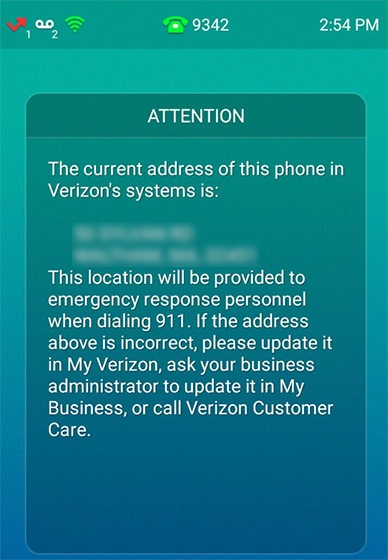
- From the 911 notification screen, tapOK.The 911 screen displays after successful activation.