Verizon 5G Internet Gateway (LVSKIHP) - Turn Network Name (SSID) On / Off
Here's how to allow the Wi-Fi name of the 5G Internet Gateway (LVSKIHP) to be seen by other devices.
- Every wireless access point (e.g., router, hotspot) has a network name or SSID (Service Set Identifier) assigned to it.
- SSID is typically broadcast by default, but can be turned off for greater security.
- When turned off, any device attempting an initial connection must know the SSID name and password to establish a manual connection to it.For the easiest connection experience, it's recommended to leave broadcast turned on.
This content is for the 5G Internet Gateway (LVSKIHP). Refer to How to Identify Verizon 5G Home Equipment if you're unsure of the device model.
- Sign in to the Admin WebGUI.
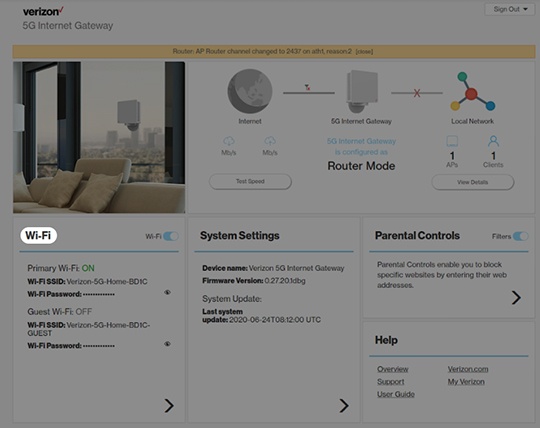
- From the Home screen, clickWi-Fi.
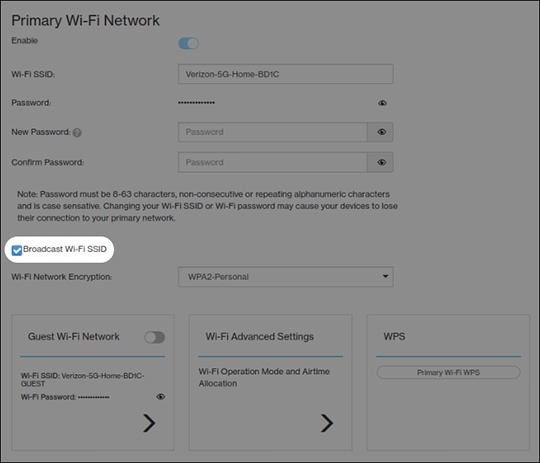
- From Wi-Fi Settings, locate and remove the checkmark from the 'Broadcast Wi-Fi Name (SSID)' field.Broadcast is enabled when a checkmark
is present.
If the SSID is disabled, the network settings on the computer must be updated. For assistance, select the appropriate operating system: - ClickSave.