Verizon 5G Internet Gateway (LVSKIHP) - Restore Settings to Factory Defaults
Here's how to restore the 5G Internet Gateway (LVSKIHP) to factory settings if it crashes, resets, freezes or runs slow.
A reset to factory default deletes all changes made to the configuration and connected clients (e.g., Network Name (SSID), Wi-Fi/Admin Password, etc.) need to reconnect.
This content is for the 5G Internet Gateway (LVSKIHP). Refer to How to Identify Verizon 5G Home Equipment if you're unsure of the device model.
External
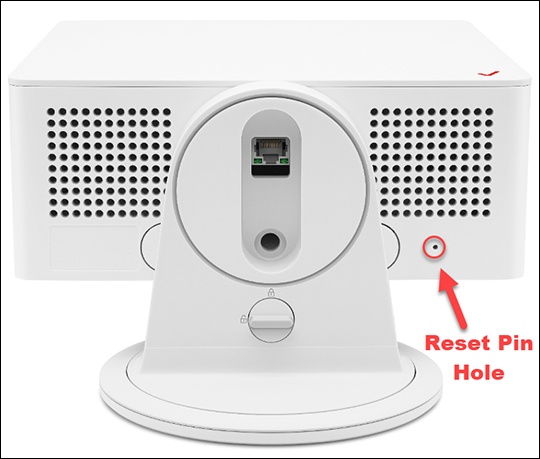
- From the bottom of the router, locate the Reset pin hole.
- Insert a paper clip then press and hold theReset buttonfor at least 5 seconds with the Gateway powered on.If a backup was done prior to the reset, perform a restore if desired.
Admin WebGUI
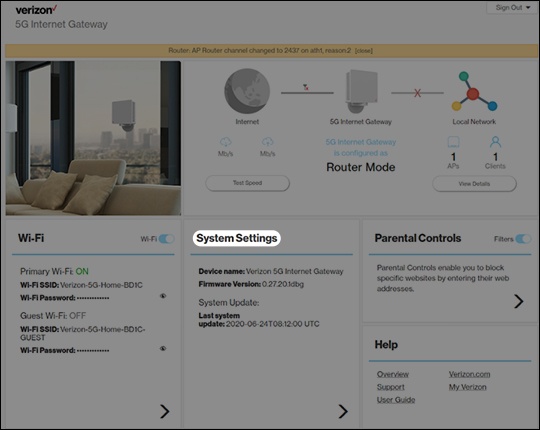
- Sign in to the Admin WebGUI.You must be connected to the 5G Internet Gateway to access the admin page.
- From the Router Home screen, clickSystem Settings.
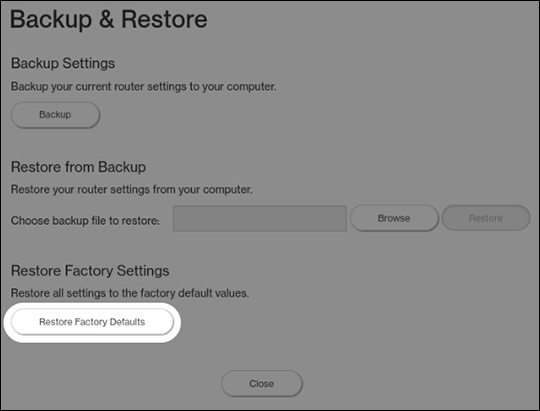
- From the General Information screen, clickBackup & Restore.
- From Backup & Restore, clickRestore Factory Defaults.If a backup was done prior to the reset, you can restore your router settings.